
S3 Pre-Signed URLs: A Practical Guide
Pre-signed URLs give clients direct access to private storage without sharing credentials or proxying bytes through your servers. Here's what they are, the problems they solve, the trade-offs to watch for (leakage, no revocation, size limits), and working implementations for S3, R2, and GCS.

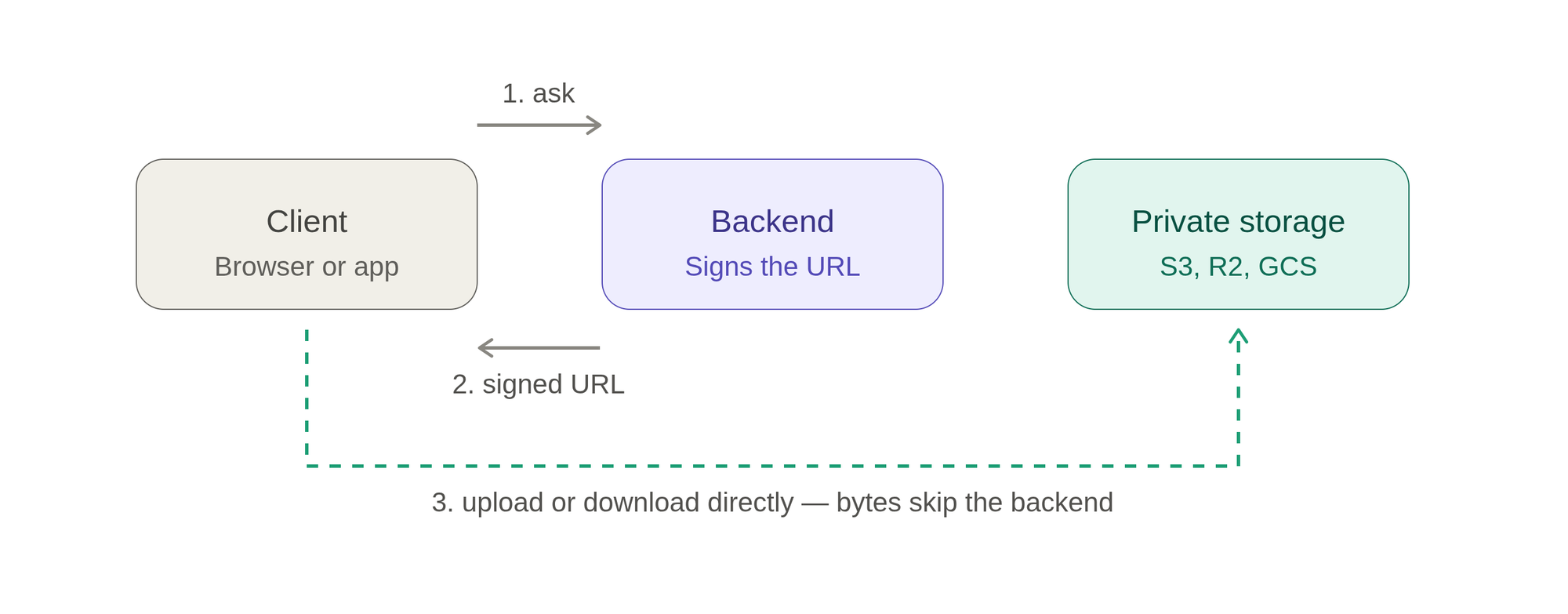
What They Are
A pre-signed URL is a regular URL that grants temporary, cryptographically-verified access to a specific object in a storage service (S3, Cloudflare R2, Google Cloud Storage, Azure Blob, etc.) without the requester needing their own credentials.
The URL carries a signature computed from your secret key over a defined set of parameters: the target object, the allowed HTTP method (GET, PUT, etc.), an expiry timestamp, and sometimes additional conditions (content type, size limits). The storage service recomputes that signature on each request and compares it. If it matches and hasn't expired, access is granted. If anything was tampered with, the signature breaks and the request is rejected.
Crucially, generating the URL happens server-side and offline — no network call to the storage provider is needed to mint one. You're just doing an HMAC computation with your secret key.
Why They Exist / What Problems They Solve
1. Keeping credentials off the client. Without pre-signed URLs, letting a browser or mobile app upload/download from private storage means either exposing your access keys (catastrophic) or proxying every byte through your backend (expensive and slow).
2. Offloading bandwidth from your servers. A 500 MB video upload can go directly from the user's device to S3, never touching your API server. Your backend only issues a small signed URL. This slashes compute, memory, and egress costs on your side.
3. Fine-grained, time-boxed access to private objects. You keep a bucket fully private, then hand out short-lived links to exactly the objects a user is authorized to see — a receipt PDF, a profile image, a report — enforced by your own auth logic before signing.
4. No new infrastructure. You get authorization, expiry, and direct transfer using only the storage provider's native signature mechanism.
What They're Good For
- Direct browser/mobile uploads to private buckets (the classic "upload avatar" or "attach document" flow).
- Serving private media: paywalled content, user-owned files, generated reports.
- Temporary sharing: "this download link expires in 15 minutes."
- Large file transfer where proxying through your API would be wasteful.
- Decoupling your API from the data plane — your servers handle who can do what, storage handles the bytes.
Cons and Caveats
- Bearer-token semantics. Anyone who obtains the URL can use it until it expires. If it leaks (logs, referrer headers, shared screenshots), it's usable by whoever holds it. Keep lifetimes short.
- No revocation. Once minted, a pre-signed URL generally can't be invalidated before expiry short of rotating the signing key (which nukes all URLs signed with it). Choose expiry windows deliberately.
- Clock and expiry tuning. Too short frustrates legitimate slow uploads; too long widens the leak window.
- Limited upload constraints by default. A basic PUT-style pre-signed URL doesn't constrain file size unless you add conditions. For strict limits (max size, content type), use POST policies (S3) or equivalent conditional signing — otherwise a user could upload something huge.
- No content validation. The storage service stores whatever bytes arrive. Virus scanning, image re-encoding, and validation must happen after the fact (e.g., triggered by an upload event).
- CORS complexity. Direct browser uploads require correct CORS configuration on the bucket, a common source of confusing failures.
- Leaks via metadata. Signed query strings can end up in access logs, browser history, and
Refererheaders. Prefer headers-based signing where sensitive, and avoid embedding them in server-side redirects that get logged.
Sample Implementations
Python (boto3, AWS S3 / S3-compatible like R2)
import boto3
from botocore.config import Config

s3 = boto3.client(
    "s3",
    endpoint_url="https://<accountid>.r2.cloudflarestorage.com",  # omit for AWS S3
    aws_access_key_id="...",
    aws_secret_access_key="...",
    config=Config(signature_version="s3v4"),
    region_name="auto",
)

# Presigned GET (download) — valid 5 minutes
download_url = s3.generate_presigned_url(
    "get_object",
    Params={"Bucket": "my-bucket", "Key": "reports/2026/summary.pdf"},
    ExpiresIn=300,
)

# Presigned PUT (upload) — client uploads directly, valid 10 minutes
upload_url = s3.generate_presigned_url(
    "put_object",
    Params={
        "Bucket": "my-bucket",
        "Key": "uploads/user-42/avatar.jpg",
        "ContentType": "image/jpeg",
    },
    ExpiresIn=600,
)
FastAPI endpoint that hands a signed upload URL to a client
from fastapi import FastAPI, Depends, HTTPException
from pydantic import BaseModel
import uuid

app = FastAPI()

ALLOWED_TYPES = {"image/jpeg", "image/png", "application/pdf"}

class UploadRequest(BaseModel):
    filename: str
    content_type: str

class UploadResponse(BaseModel):
    upload_url: str
    object_key: str

@app.post("/uploads/presign", response_model=UploadResponse)
def presign_upload(req: UploadRequest, user=Depends(get_current_user)):
    if req.content_type not in ALLOWED_TYPES:
        raise HTTPException(400, "Unsupported content type")

    # Namespacing by user id enforces ownership; never trust client-supplied paths.
    object_key = f"uploads/{user.id}/{uuid.uuid4()}-{req.filename}"

    url = s3.generate_presigned_url(
        "put_object",
        Params={
            "Bucket": "my-bucket",
            "Key": object_key,
            "ContentType": req.content_type,
        },
        ExpiresIn=600,
    )
    return UploadResponse(upload_url=url, object_key=object_key)
Enforcing size limits with a POST policy (S3)
A plain PUT URL can't cap file size; a presigned POST can:
post = s3.generate_presigned_post(
    Bucket="my-bucket",
    Key="uploads/user-42/${filename}",
    Fields={"Content-Type": "image/jpeg"},
    Conditions=[
        {"Content-Type": "image/jpeg"},
        ["content-length-range", 1, 5 * 1024 * 1024],  # 1 byte–5 MB
    ],
    ExpiresIn=600,
)
# Returns {"url": ..., "fields": {...}} — the client posts these as multipart form-data.
Browser-side upload using the signed PUT URL
async function uploadFile(file) {
  // 1. Ask your backend for a signed URL
  const res = await fetch("/uploads/presign", {
    method: "POST",
    headers: { "Content-Type": "application/json" },
    body: JSON.stringify({ filename: file.name, content_type: file.type }),
  });
  const { upload_url, object_key } = await res.json();

  // 2. Upload the bytes straight to storage — no backend in the data path
  await fetch(upload_url, {
    method: "PUT",
    headers: { "Content-Type": file.type },
    body: file,
  });

  // 3. Tell your backend the upload finished, referencing object_key
  await fetch("/uploads/complete", {
    method: "POST",
    headers: { "Content-Type": "application/json" },
    body: JSON.stringify({ object_key }),
  });

  return object_key;
}
Google Cloud Storage (Python)
from google.cloud import storage
from datetime import timedelta

client = storage.Client()
blob = client.bucket("my-bucket").blob("uploads/user-42/avatar.jpg")

upload_url = blob.generate_signed_url(
    version="v4",
    expiration=timedelta(minutes=10),
    method="PUT",
    content_type="image/jpeg",
)
Practical Guidance
- Sign short, sign narrowly. Keep expiry windows tight and scope each URL to a single object and method.
- Authorize before you sign. The signature proves the URL is valid, not this user should have it. Run your own permission checks before minting.
- Control the object key server-side. Namespace by user/tenant and generate unique keys; never let clients dictate arbitrary paths (path traversal, overwrites).
- Validate after upload. Trigger scanning, re-encoding, and metadata extraction from a storage event or a "complete" callback — the storage layer accepts whatever arrives.
- Configure CORS on the bucket for direct browser uploads.
- Prefer POST policies when you need size or content constraints enforced at upload time.


